


Nitrokey App Release v2.1.2
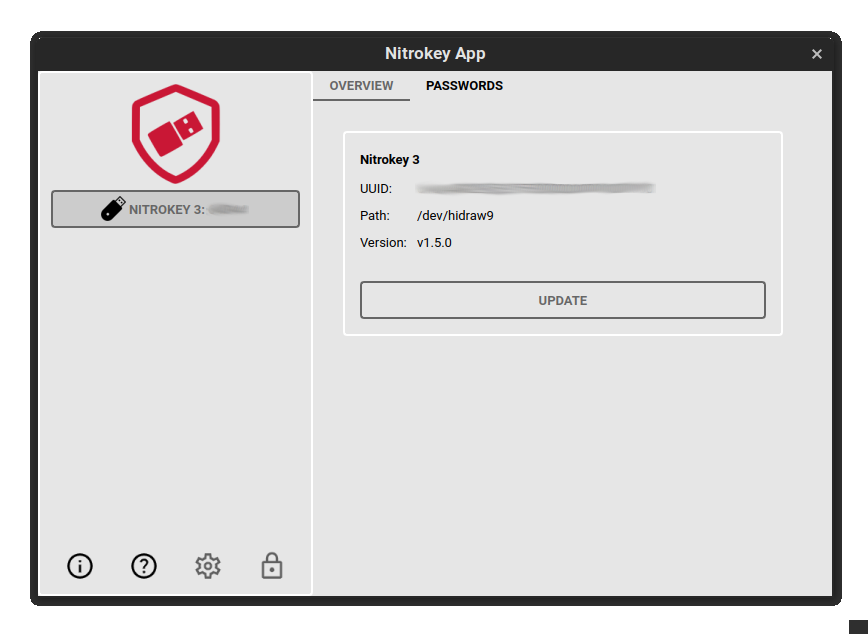
Wir freuen uns, Ihnen ein kurzes Update über die Fortschritte der Nitrokey App 2 geben zu können. Als Reaktion auf das Feedback der Benutzer haben wir die Funktionalität der Anwendung erweitert. In der neusten Version v2.1.2 können Sie nun Einmalpasswörter (OTP) auf Ihrem Nitrokey 3-Gerät verwalten, wobei sowohl HOTP als auch TOTP unterstützt werden.
Außerdem haben wir die Benutzeroberfläche der Nitrokey App 2 im Material-Design aktualisiert, um eine visuell ansprechende und zeitgemäße Darstellung zu bieten. Die Material-Design-Prinzipien bieten ein sauberes und intuitives Layout, das die Navigation und Interaktion mit der Anwendung erleichtert.
Comments
- a) It would be helpful if the App would tell me about updated version of the app. I just found out after some pretty annoying search.
- b) Even going to your webpage under support / downloads leads me just to app v1.4. That needs fixing as well I guess.
- c) app v2.1.2 does offer an "update" of the firmware even though it later tells me that I already have the latest one. Should be fixed.
- d) The app UI for "passwords" on windows does use some weird font scaling. The font used on my 4k screen with 150% windows scaling yields much to large fonts there. The content texts on the "overview" tab are like half size
- e) Nice to see OTP being supported, but in practice I would need some step-by-step instructions on how to use this now. Could be a brief video tutorial or whatever, but having no entry-level user fit instructions will not really add to the appeal of your product. Yes I can spend some hours trying to figure out, but is that your expectation?
- f) It took me quite a while to figure out that I have to first actively mouseclick on the nitrokey entry on the top left side of the app UI under the red logo to even bring up the functionality with the tabs "overview" and "passwords". This also is a usability stumbling block.
Please do not take this as attack. Just sharing my observations and feeling.- 1- Application does not start with Debian Bullseye.
It requires Debian Bookworm. With Debian Bullseye, starting nitrokey-app-v2.1.2-x64-linux-binary triggers the following error
----
[3822] Error loading Python lib '/tmp/_MEIvY8808/libpython3.9.so.1.0': dlopen: /lib/x86_64-linux-gnu/libm.so.6: version `GLIBC_2.35' not found (required by /tmp/_MEIvY8808/libpython3.9.so.1.0)
----
That is solved by upgrading to Debian Bookworm, that comes with libc6 2.36-9+deb12u1 (instead of libc 2.31-13+deb11u6 in Bullseye).
- 2- Bottom left icons
A mouse over offering a glimpse of what they are for would be nice (yes, I undersood the application is very young; it may just become a wish down the road).
- 3- Help through About
In the About window (first most-left icon) link Instructions and help triggers an error in QubesOS.
----
ERROR: Tor Browser ended with non-zero (error) exit code!
Tor Browser was started with:
/home/user/.tb/tor-browser/Browser/start-tor-browser --verbose --allow-remote https://www.nitrokey.com/start
Tor Browser exited with code: 127
OPEN_LINK_CONFIRMATION_COUNTER: 1
To see this for yourself, you could try:
Start Menu -> System -> Xfce Terminal
Then run:
/home/user/.tb/tor-browser/Browser/start-tor-browser --verbose --allow-remote https://www.nitrokey.com/start
See online documentation:
----
- 4- Help
Clicking on the second most left icon (?) triggers the same error as above.
- 5- Icons Setting and Lock
Those are unactivated for me (in a disposable Qubes, freshly updated to Bookworm, Nitrokey3 recognized).
- 6- Firmware upgrade
It does not work (v1.4 is installed, and application suggests to upgrade to 1.5).
It does not work either with nitropy, the CLI client.
But, I will open a proper bug report later on, when I have time.
- 7- Tab Passwords
Indicates to first upgrade to v1.5. Good :)
Hope it helps. RauðiAdd new comment